VirtualBox free download
Posted by: Cătălin Dascălu, last update
VirtualBox free download for Windows / Linux / Mac!
*Download VirtualBox clicking on the link free download below on this page!
VirtualBox
VirtualBox is a computer program that allows users to test different operating systems simultaneously.
Operating systems: Windows / Linux / Mac
License: Freeware
Size: 87.50 mb
Developer's website: VirtualBox
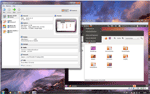
Download for free VirtualBox - the latest version!
VirtualBox is very useful for the evaluation of new operating systems, which are still in beta, to prevent data loss and conflict.
The VirtualBox program is also very useful to test how it works the software on other operating systems.
With VirtualBox, you can have at the same time on the same computer, installed Windows, Linux or Mac.
VirtualBox is a virtualization program well structured, the program has a full and intuitive toolbar.
VirtualBox - system requirements
VirtualBox works with Windows operating systems - Windows 98 / Windows 2000 / Windows XP / Windows Vista / Windows 7 / Windows 8 / Windows 8.1 / Windows 10 / Windows 11 - Mac and Linux, works very well with Windows 10 and Windows 8.1.
* For use VirtualBox need a minimum:
Processor: 1 GHz Pentium|| Memory: 128 Mb of RAM|| Free disk space: 1 GB||
* It is recommended:
Processor: 2,4 GHz Pentium|| Memory: 3 Gb of RAM|| Free disk space: 4 GB|| Broadband Internet||
VirtualBox - main features
The main features of VirtualBox are:
- Installing multiple operating systems on the same computer;
- Supports the most operating systems;
- Evaluation of software on different operating systems;
- Simple and intuitive interface;
- VirtualBox is an application easy to use;
- Support in different languages;
- Manual Update;
- Support install / uninstall, etc.
VirtualBox - other features
VirtualBox is an easy to use and install program, the VirtualBox program consumes many system resources and takes up much hard disk space.
VirtualBox has a simple and intuitive interface from which anyone can use the program without any problem.
VirtualBox is a very good application of the category "virtualization software", a software that deserves to have it installed on your computer.
The download link will take you to the official download web page of the author.
To download for free VirtualBox go to the download page by clicking on the button below:

Alternatives to the VirtualBox app:
LeapDroid
a computer program that allows users to emulate the Android operating system.

VirtualBox
a computer program that allows users to test different operating systems simultaneously.
0 Comments / Feedbacks / Reviews
VirtualBox - opinions, comments:
Do you often use VirtualBox? Are you an expert or inexperienced user? Have you formed an opinion about VirtualBox or just want to know more? Then this is the place to review or ask for more details!
VirtualBox - ask for help:
Have a problem with VirtualBox and do not know how to fix it or something is not working properly, then ask for help!
Describe the problem in detail, do not forget to specify details about the computer - operating system, processor, memory - and from where you downloaded VirtualBox.
You can also ask for help if you experience downloading or installing problems.
VirtualBox - review:
If you are an expert in VirtualBox, or you are a user of VirtualBox disappointed and believe that the information on this page is insufficient, write a review, positive or critical, arguing your opinion.
VirtualBox - errors, spelling errors, incomplete information:
Because we want the information on this page to be high quality, we ask your help, because, with you, we want to achieve our goal.
So, if you find grammar, expression or spelling errors - keep in mind that we are not native speakers of English, inaccurate or incomplete information, or several other errors, please show us!
All comments will be manually reviewed before being published!
Thank you in advance for your cooperation!
Softfree.eu is not responsible for how you will use the information from this description, or how you will be using this program. Softfree.eu informs that VirtualBox should be used in compliance with laws and intellectual property rules and the current Penal Code. We leave it to your discretion to determine whether this product or how you plan to use is legal. Do not approve or encourage in any way the use of any software in contravention with the laws in force. The purpose and intent of the site Softfree.eu are limited only to provide information to users and nothing else.


